How We Built an Embeddable Pricing Calculator for MedSpaCopy
We developed a pricing calculator for MedSpaCopy, our brand for med spas. A clinic can configure its treatment prices and calculator settings, check the result in a live preview, and generate an installation snippet for its website. Visitors then use the configured calculator directly on the clinic's site.
The project combines a visual builder, an embeddable widget, and a separate API. We built the setup and publishing workflow so clinics can create their own configured calculator without writing its calculation logic or interface.
Explore the calculator builderOne product, configured for each clinic
A reusable calculator needs to accommodate the details that differ between clinics: the products they offer, their prices, and how the calculator looks on their website. The builder brings those settings together and shows a preview before publication.
The starting calculation presets were supplied by a practicing physician. Our engineering work translated that model into configurable inputs and a working interface, then connected it to the publishing and installation flow.
Building the product ourselves gave us control over that complete workflow: what a clinic can configure, how settings are published, and how the resulting widget is delivered to another website.
From setup to a working calculator
Configure
Enter the clinic's prices, adjust the available calculator settings, and specify the website where it will be used.
Preview
See how the configured calculator will look and respond before publishing it.
Publish
Create a published configuration and receive its installation snippet.
Install
Add the snippet to the clinic's website to load the visitor-facing calculator.
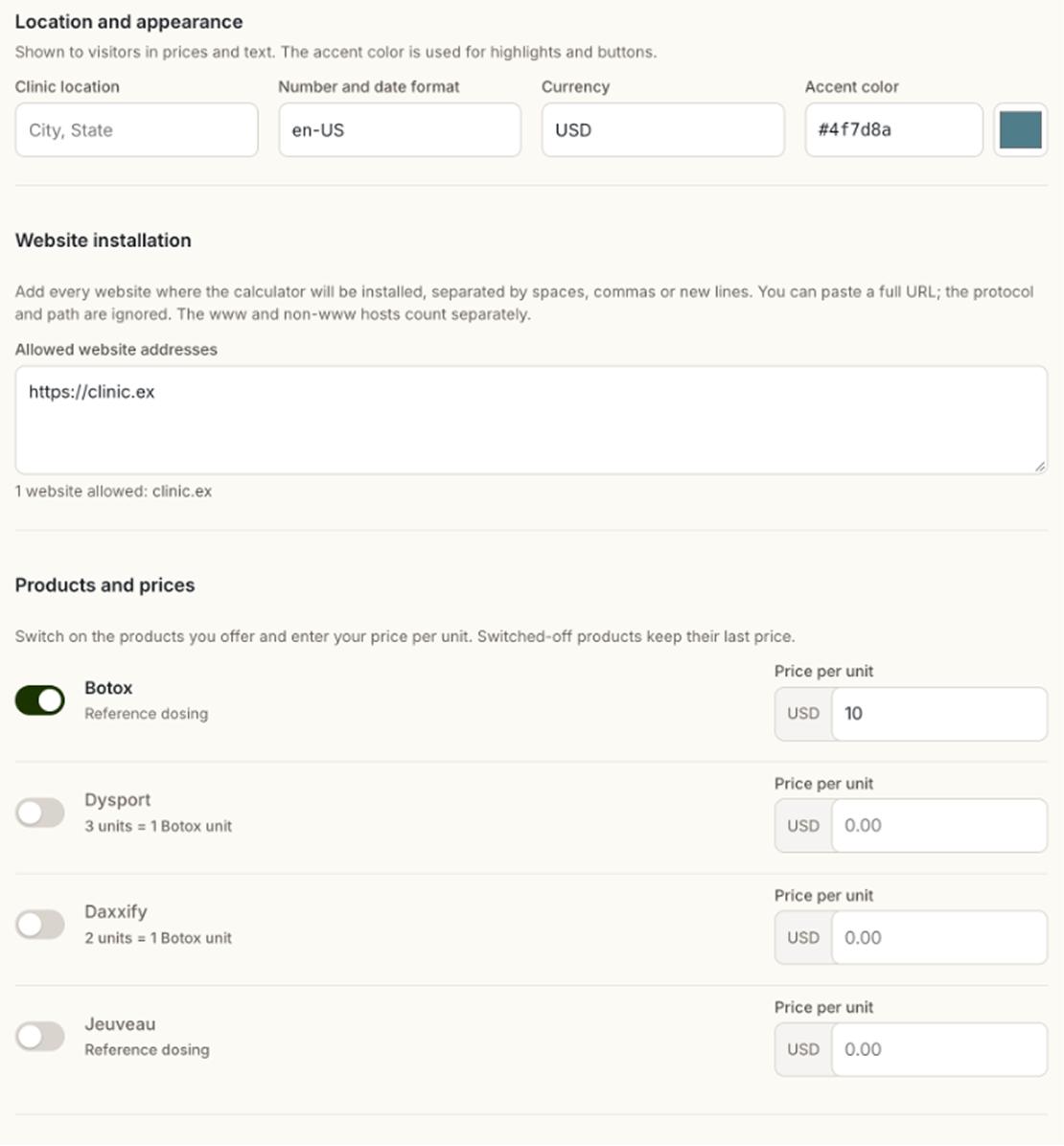

The values shown in these screenshots (a sample clinic setup with a Botox price of $10 per unit) are example demo settings for illustration, not a real clinic's data.
The full flow has been tested through creation, snippet generation, and operation on a separate test page. The clinic's visitors load the calculator widget; the builder's editing interface stays on MedSpaCopy. Screenshots for the Publish and Install steps are not shown here: the installation snippet is behind a verification check by design, and the widget-on-another-site view needs a staged page.
Price updates are deliberate
Changing settings in the MedSpaCopy builder does not update a calculator already installed on a clinic's site. To apply the revised settings, the clinic generates updated installation code and replaces the code on its website.
How the components fit together
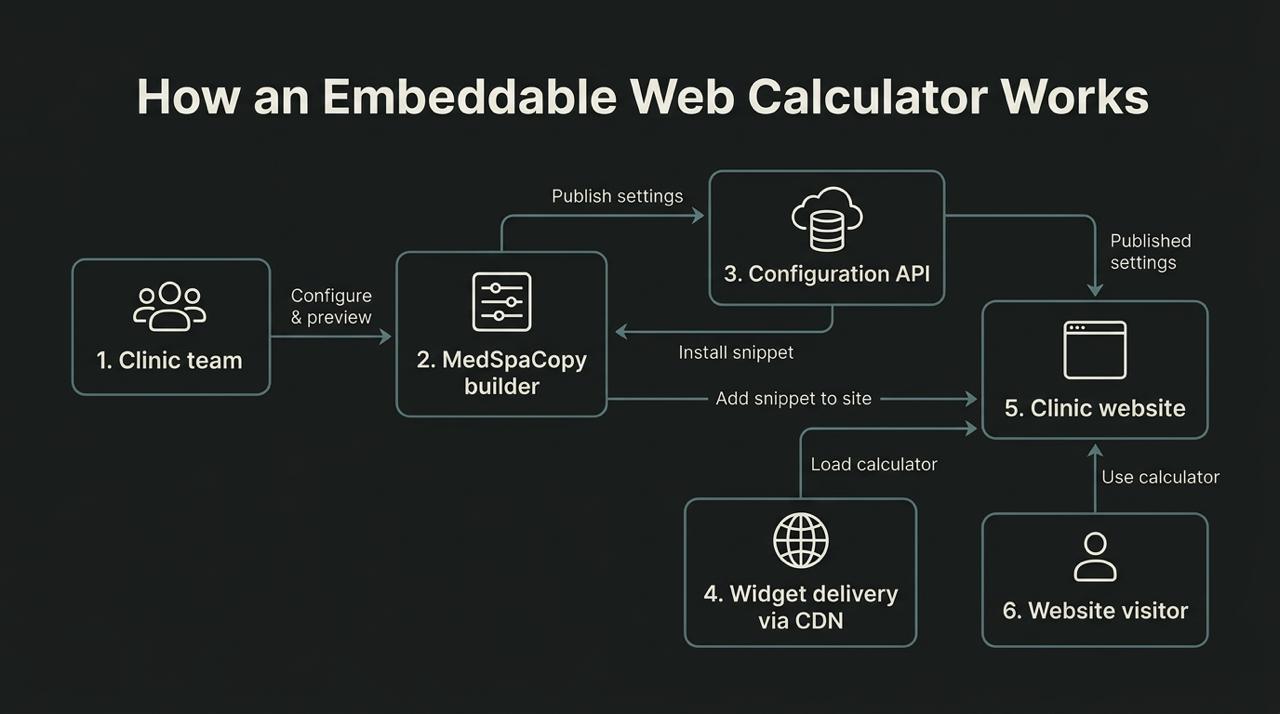
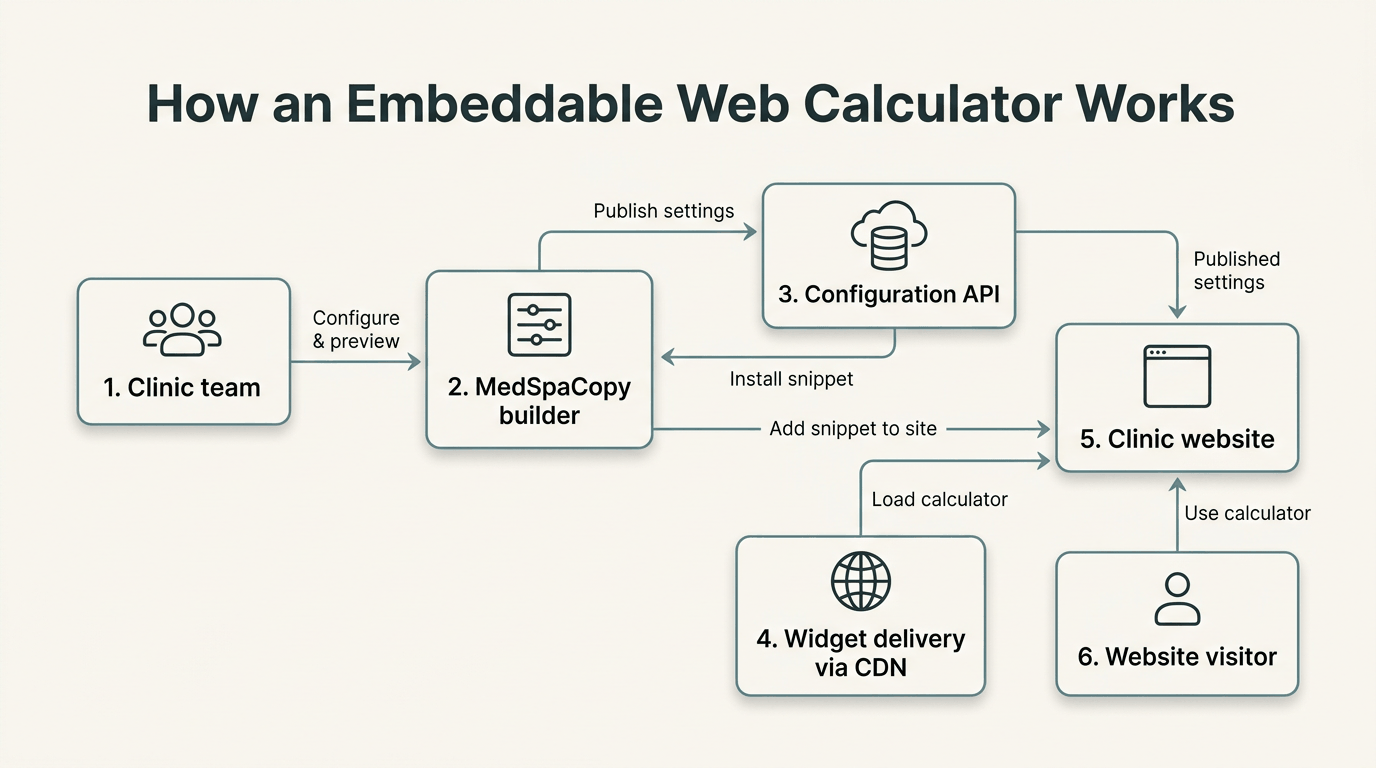
The MedSpaCopy site provides the setup interface. A separate API handles published configurations, while the widget loads on the clinic's website and uses the configuration selected by its installation code.
| Component | Role in the product |
|---|---|
| Next.js and React | The MedSpaCopy page that hosts the builder and live preview |
| Native Web Components | The setup interface and calculator components |
| TypeScript | Typed configuration and component integration |
| Cloudflare Workers | The configuration API |
| D1 and KV | Configuration storage and a read cache |
| R2 and CDN delivery | Distribution of the widget assets |
| Turnstile and request limits | Protection of the configuration-creation flow |
This separation lets us work on the MedSpaCopy site, the API, and the distributed widget as distinct parts of the product.
Engineering for a component that leaves our own site
The central challenge was connecting a modern React-based builder to a component intended for use on another website. We addressed that at three levels.
Keep the visitor-facing component separate
The calculator has its own browser-loaded bundle. Installing it does not require copying the MedSpaCopy page or its builder interface to the clinic's website. Web Components provide the component boundary, with Shadow DOM helping separate the widget's internal styles from the surrounding page.
Make loading state explicit
In the builder, a downloaded script is not enough to mark a component as ready. The interface also waits for the custom element to be registered. The loading flow includes timeout and retry handling, so it can respond when a component fails to become available.
Keep the integration predictable
Typed interfaces connect the builder's settings and events to the components. The MedSpaCopy integration also accounts for the page's Content Security Policy when loading scripts and component styles.
These decisions support a calculator that can be configured in one place and used elsewhere. The host website still needs to permit the embed script and its required connections; installation requirements are part of the integration work.
Publishing and protection
Configuration creation goes through the MedSpaCopy server before reaching the API. The server holds the credential used for that request, while verification and request limits protect the publishing flow. Clinics do not need an account or email address to use the builder, and draft settings are kept in the browser.
Deployment follows three separate paths. The API is released to Cloudflare Workers. Widget assets are published to R2 and delivered through the CDN. The MedSpaCopy site is deployed separately to its server.
That distinction also matters for maintenance: changing a clinic's published settings and releasing an updated shared widget are separate operations. Replacing the installation code applies the clinic's revised configuration; updates to the shared software have their own release process.
What we delivered
The result is a working setup-to-installation flow: a configurable builder with live preview, a publication API, and a calculator that runs on a separate website. It demonstrates the connected frontend and backend work involved in turning a calculation model into a reusable web product.
The same project pattern can support other tools with their own business rules, such as service estimators or product-selection widgets. Each project needs its own calculation model, configuration options, and integration requirements.
Need a custom calculator for your website?
Tell us what the calculator should estimate, who will maintain its settings, and where it needs to run. We can use those requirements to scope the interface, calculation logic, publishing workflow, and integrations.
Discuss your projectExplore our web application development, API development, and Next.js development services.